
Escape JSON
Paste text to escape it for use inside a JSON string: double quotes, backslashes, line breaks, tabs and control characters are converted to their JSON escape sequences. Switch to unescape to turn a JSON string back into readable text, or validate and pretty-print a whole JSON document. Everything happens in your browser.
- Free to use
- No sign-up
- Runs in your browser
JSON escape / unescape
Formatting and embedding use browser number precision. Numbers that would change when re-serialized are rejected; use strings or a lossless parser for exact values. Duplicate object names keep the last value. One \uXXXX escape is a UTF-16 code unit; characters above U+FFFF need a pair, such as \uD83D\uDE00 for U+1F600.
JSON Developer Cheat Sheets
Four PDFs (5 pages) are free individually. The $5 ZIP adds two editable Word files and two Excel files: a static schema reference and a blank manual test log. There are 9 files including README. The Excel files do not validate JSON or calculate pass/fail results.
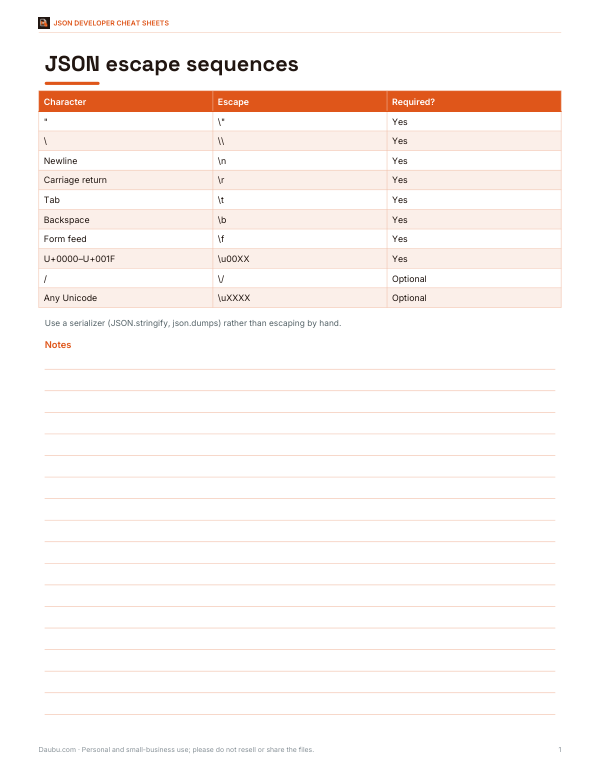
- Escaping cheat sheet (PDF)
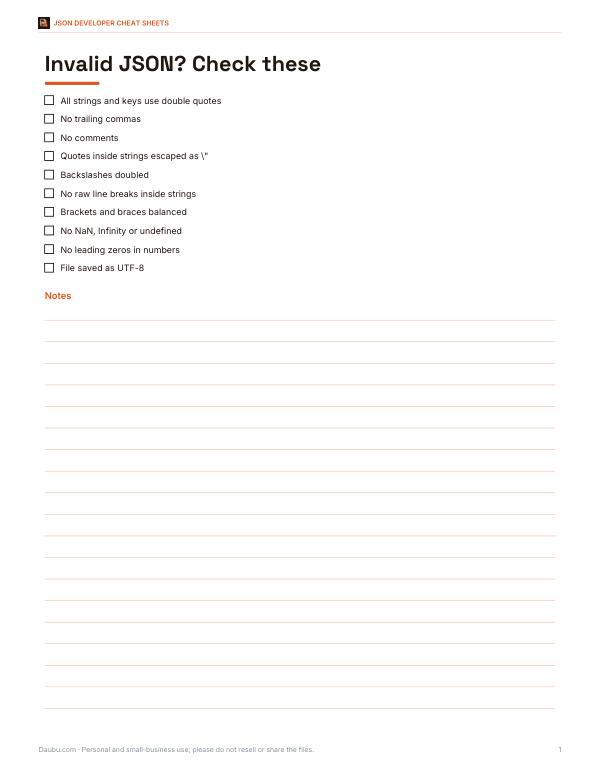
- Error checklist (PDF, DOCX)
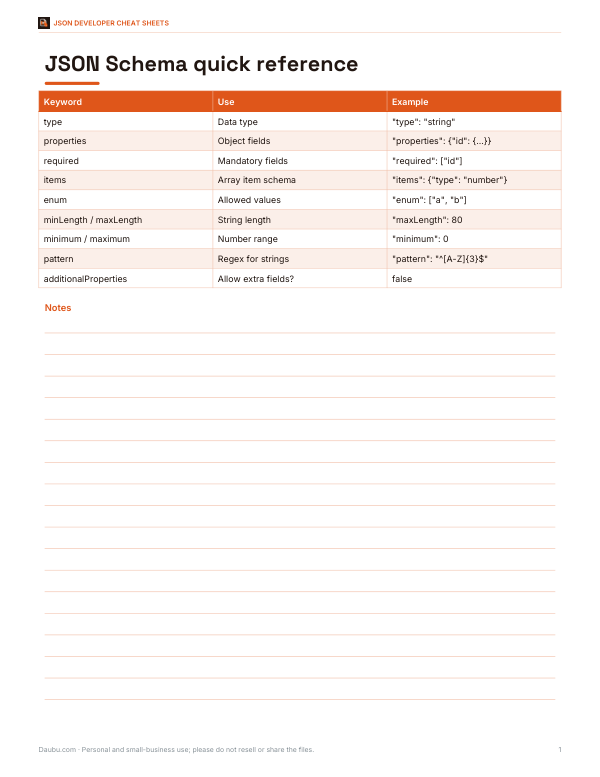
- Schema reference (PDF)
- Test cases (XLSX)
Formats: PDF, DOCX, XLSX. Instant download after payment (link valid 72 hours, up to 5 downloads). AI-assisted: the templates were drafted with AI help and reviewed and laid out before publishing.
$5.00 USD, one-time 4 PDFs + 2 DOCX + 2 XLSX + README
- Instant download
- 7-day refund
- Secure checkout by Stripe
7-day money-back guarantee. Full refund within 7 days of purchase, even after you download.
Free sample: API Payload Test Cases (PDF, 63 KB)
Full refund within 7 days — see the refund policy and license.
Free printables
Single sheets you can print right now, no sign-up. The full pack adds every sheet in one download plus the editable files.
 Printable JSON Escape Test Cases
Why JSON strings need escaping
JSON strings are wrapped in double quotes, so a double quote inside the text would end the string early and break the document. The backslash is the escape character, so a literal backslash must be doubled. JSON also forbids raw control characters — including real line breaks and tabs — inside strings; they must be written as escape sequences. Escaping converts text into a form that can sit safely between the quotes of a JSON value.
JSON escape sequences
| Character | Escaped as | Notes |
|---|---|---|
| Double quote " | \" | Required |
| Backslash \ | \\ | Required |
| Newline (LF) | \n | Required — raw line breaks are not allowed |
| Carriage return (CR) | \r | Required |
| Tab | \t | Required |
| Backspace | \b | Control character |
| Form feed | \f | Control character |
| Other control characters U+0000–U+001F | \u0000 … \u001f | Required |
| Forward slash / | \/ | Optional — allowed but not required |
| BMP code point | \uXXXX | Optional — useful for ASCII-only systems |
Characters outside the Basic Multilingual Plane, such as most emoji, are written as two \u escapes (a surrogate pair) when escaped: 😀 becomes \ud83d\ude00.
Escape, unescape, stringify and format
- Escape turns plain text into the inside of a JSON string, optionally with the surrounding quotes. Use it when pasting text into a JSON file, API request body or configuration value.
- Unescape reverses the process: paste a JSON string (with or without quotes) to see the original text, with real line breaks and quotes.
- Stringify JSON takes a whole JSON document and turns it into a string value — needed when an API expects JSON embedded inside another JSON field, such as a message payload.
- Validate and format checks that a document is valid JSON and pretty-prints it with two-space indentation, pointing to the position of any syntax error.
Worked example
The text He said "hello" followed by a new line and a Windows path C:\Users\Ana escapes to "He said \"hello\"\nPath: C:\\Users\\Ana". The two quotes become \", the line break becomes \n, and each backslash in the path is doubled. With “Escape non-ASCII” turned on, the euro sign € becomes \u20ac, which is handy when the receiving system is not UTF-8 aware.
Escaping in code
| Language | Escape (serialize) | Unescape (parse) |
|---|---|---|
| JavaScript | JSON.stringify(text) | JSON.parse(jsonString) |
| Python | json.dumps(text) | json.loads(json_string) |
| PHP | json_encode($text) | json_decode($json) |
| Java (Jackson) | mapper.writeValueAsString(text) | mapper.readValue(json, String.class) |
| C# (.NET) | JsonSerializer.Serialize(text) | JsonSerializer.Deserialize<string>(json) |
| Go | json.Marshal(text) | json.Unmarshal(data, &s) |
In code, always build JSON with a serializer rather than joining strings by hand. Hand-built JSON is the most common source of escaping bugs and can lead to injection problems when user input contains quotes.
Common JSON errors
- Unescaped quotes inside a string — escape them as \".
- Single quotes around strings or keys — JSON requires double quotes.
- Trailing commas after the last item in an object or array are not allowed.
- Comments are not part of JSON; remove // and /* */ lines.
- Raw line breaks inside strings — replace with \n.
- Unquoted keys such as {name: "x"} — keys must be quoted strings.
- Special numbers such as NaN, Infinity or leading zeros are not valid JSON.
JSON escaping vs other escaping
Escaping rules depend on where text ends up. JSON escaping protects the JSON syntax only. When JSON is placed inside HTML, the characters <, > and & may also need escaping to avoid breaking the page or allowing script injection — for example, a string containing </script> inside an inline script block. URLs use percent-encoding, SQL uses parameter binding, and CSV doubles quotes. Using the wrong kind of escaping for the context is a frequent cause of bugs.
Double-escaped strings
If you see text like \\n or \\\", the string has probably been escaped twice — often because JSON was stringified and then stringified again. Run Unescape once to remove one layer; if the result still contains escape sequences and looks like JSON, run it again or switch to Validate and format. When designing APIs, prefer sending nested objects rather than JSON strings inside JSON.
Unicode and encoding
JSON text is normally exchanged as UTF-8, and any Unicode character may appear unescaped in a string. Escaping non-ASCII as \uXXXX makes the output pure ASCII, which can help with older systems, logs or email, at the cost of readability. The two forms are equivalent: a JSON parser reads \u00e9 and é as the same character.
Escaping inside JSON in other files
JSON often travels inside other formats, and each layer adds its own rules. In a shell command, JSON passed to curl with -d must also respect the shell’s quoting: wrap it in single quotes on Linux and macOS, and escape inner double quotes on Windows Command Prompt. In environment variables and .env files, some tools expect the whole JSON value on one line. In YAML, JSON strings are usually safest inside single quotes. When in doubt, save the JSON to a file and pass the file name instead of the raw text.
Privacy
All processing happens locally in your browser. Your text, API payloads and keys are never uploaded, logged or stored — but avoid pasting secrets into any web page on a shared computer.
Frequently asked questions
How do I escape a double quote in JSON?
Write it as \" inside the string.
How do I put a newline in a JSON string?
Use \n; raw line breaks are not allowed inside JSON strings.
Do I need to escape forward slashes in JSON?
No, \/ is allowed but optional.
How do I unescape a JSON string?
Parse it with a JSON parser or use Unescape mode here.
Why does my JSON have \\n in it?
It has probably been escaped twice; unescape once to remove a layer.
Is my data uploaded?
No, everything runs in your browser.